
The "Zero-Effort" Twitch-to-Youtube Pipeline Part 2
I won't do a rehash of the previous article that I wrote back in February of 2026. It was a very lengthy process and since its birth, I've updated some things. If you want to go read that, please do that now before continuing further in this post or you will be lost as hell.
With a lot of projects, testing, updating, re-testing, and improvements are bound to happen. This project is no different and 6 months later, it's time for an update post.
What did I add:
- A new way to keep the token regeneration without the need for human intervention
- Handling long stream names that prevented the uploading to YouTube
- Getting clips
- Working with "special" clips such as Ko-fi and Patreon interactions
Stopping the Need for Human Interaction - Token Edition
Quick edit to the original script. This was mostly due to finding the actual code to handle the auto-request for this, as well as just being lazy:
if creds.expired and creds.refresh_token:
    creds.refresh(Request())
    with open(TOKEN_FILE, 'w') as f:
        f.write(creds.to_json())
Handling Long Stream Names for Youtube Upload
Over the past 6 months, there would be times I ran into a VOD getting all the way through the process until the uploading part. No error was given, no exception thrown, nothing. The script would finish its run and close the window. Not until a moderator told me that my past few streams were not showing up on YouTube did I realize that it was failing. The next stream, I sat at my desk and literally watched the entire thing run, trying to nail down the source of failure.
googleapiclient.errors.ResumableUploadError: <HttpError 400 when requesting None returned
"The request metadata specifies an invalid or empty video title.".
Details: "[{'message': 'The request metadata specifies an invalid or empty video title.',
'domain': 'youtube.video', 'reason': 'invalidTitle', 'location': 'body.snippet.title',
'locationType': 'other'}]"
This made me think that there was some weird issue with the title being grabbed from the VOD. Yet, the terminal output right above this error showed the title being just fine:
Uploading: [10-07-2026] [ARCHIVE] LAST STREAM B4 TENNOCON! Hex Tasks, Nokko Bounties, & Starting the Memoria GrindClearly the title wasn't empty and I was starting to get a bit frustrated with this situation because I just couldn't figure it out. Turns out, it was nothing to do with my script. YouTube has a hard cap of 100 characters. I use the format of
[DD-MM-YYYY] [ARCHIVE] in my prefix uploads. That's 23 characters long. So if I have a stream title that gets kind of lengthy, it fails to upload. Anything that landed within the ~77-100 character range was in the danger zone. Now that I found the issue, the fix:
date_str        = datetime.now().strftime("%d-%m-%Y")
formatted_title = f"[{date_str}] [ARCHIVE] {stream_title}"
if len(formatted_title) > 100:
    formatted_title = formatted_title[:97] + "..."
print(f"Title: {formatted_title}")
This essentially gives my longer stream titles a truncated name on YouTube.
Clip Capturing and Sharing
As I had mentioned in the previous article, I wanted to handle clip capturing with Streamer.bot. I didn't share much of anything of that entire set up because it was still a work-in-progress. Well, I've got it figured out and it is working like a charm.
For my set-up, I wanted multiple ways for a clip to get captured: a physical button, a chat command, and an automatic pipeline that turns these clips into YouTube shorts. I'm one of those people that if one way doesn't work or I forget to do it, there's another route.
I've essentially redone my entire process, so I've updated the files below.
This update needs two additional setup pieces beyond the Google/YouTube credentials from Part 1.
New installs: add requests and google-auth to what you already installed:
requests
google-auth
Registering a Twitch app: head to the Twitch Developer Console, click Register Your Application, give it a name, set the OAuth Redirect URL to http://localhost, and pick Category: Application Integration. Once created, click Manage to grab your Client ID, then generate a Client Secret. These go into a new file, twitch_secret.json:
{
  "client_id": "YOUR_TWITCH_CLIENT_ID_HERE",
  "client_secret": "YOUR_TWITCH_CLIENT_SECRET_HERE"
}
One more field for clip creation: creating clips via the Twitch API needs a user access token with clips:edit scope – the app credentials above aren't enough alone. I generate mine at twitchtokengenerator.com, then add it as a user_token field in the same file:
{
  "client_id": "YOUR_TWITCH_CLIENT_ID_HERE",
  "client_secret": "YOUR_TWITCH_CLIENT_SECRET_HERE",
  "user_token": "YOUR_USER_ACCESS_TOKEN_HERE"
}
Place twitch_secret.json in the same folder as everything else. Now, onto the archiver.py.
archiver.py
import sys
import os
import time
import json
import subprocess
import threading
import webbrowser
import requests
from http.server import HTTPServer, BaseHTTPRequestHandler
from datetime import datetime, timezone
from urllib.parse import parse_qs
from yt_dlp import YoutubeDL
from googleapiclient.discovery import build
from googleapiclient.http import MediaFileUpload
from google.oauth2.credentials import Credentials
from google.auth.transport.requests import Request
# =============================================================================
# SETTINGS — edit these as needed
# =============================================================================
BASE_DIR = os.path.dirname(os.path.abspath(__file__))
TOKEN_FILE = os.path.join(BASE_DIR, 'token.json')
YT_SECRET_FILE = os.path.join(BASE_DIR, 'client_secret.json')
TW_SECRET_FILE = os.path.join(BASE_DIR, 'twitch_secret.json')
SUPPORTER_LOG = os.path.join(BASE_DIR, 'supporter_clips.json')
TWITCH_USERNAME = "YOUR TWITCH USERNAME HERE, NOT A BOT YOUR OWN USERNAME"
TWITCH_VOD_URL = f"https://www.twitch.tv/{TWITCH_USERNAME}/videos?filter=archives"
SCOPES = ['https://www.googleapis.com/auth/youtube.upload']
# FFmpeg crop settings for Shorts (update if your stream layout changes)
FACECAM_CROP = "480:360:1440:0" # w:h:x:y — top-right facecam
GAMEPLAY_CROP = "607:1080:656:0" # w:h:x:y — centre gameplay
FONT_FILE = os.path.join(BASE_DIR, 'WHATEVER FONT YOU WANT TO PUT HERE.ttf')
# Split-stream detection window
SPLIT_WINDOW_HOURS = 6
# Clip review server port
REVIEW_SERVER_PORT = 9876
# =============================================================================
# TWITCH API
# =============================================================================
def load_twitch_credentials():
if not os.path.exists(TW_SECRET_FILE):
print(f"CRITICAL: twitch_secret.json not found in {BASE_DIR}")
sys.exit(1)
with open(TW_SECRET_FILE) as f:
data = json.load(f)
return data['client_id'], data['client_secret']
def get_twitch_token(client_id, client_secret):
resp = requests.post('https://id.twitch.tv/oauth2/token', params={
'client_id': client_id,
'client_secret': client_secret,
'grant_type': 'client_credentials'
})
resp.raise_for_status()
return resp.json()['access_token']
def get_twitch_user_id(client_id, token):
resp = requests.get('https://api.twitch.tv/helix/users',
params={'login': TWITCH_USERNAME},
headers={'Client-ID': client_id, 'Authorization': f'Bearer {token}'}
)
resp.raise_for_status()
return resp.json()['data'][0]['id']
def fetch_clips_since(client_id, token, user_id, started_at):
"""Fetches all clips created after started_at (ISO 8601 string)."""
clips = []
cursor = None
while True:
params = {'broadcaster_id': user_id, 'started_at': started_at, 'first': 20}
if cursor:
params['after'] = cursor
resp = requests.get('https://api.twitch.tv/helix/clips',
params=params,
headers={'Client-ID': client_id, 'Authorization': f'Bearer {token}'}
)
resp.raise_for_status()
data = resp.json()
clips.extend(data.get('data', []))
cursor = data.get('pagination', {}).get('cursor')
if not cursor or not data.get('data'):
break
return clips
def create_twitch_clip(client_id, token, broadcaster_id):
"""
Creates a clip of the current live stream via the Twitch API.
Returns the clip ID if successful, None otherwise.
Note: requires a user access token with clips:edit scope, not just app token.
We use the OAuth token from twitch_secret.json if a user_token field exists,
otherwise we fall back to app token (may not work for clip creation).
"""
# Load user token if available
with open(TW_SECRET_FILE) as f:
tw_data = json.load(f)
user_token = tw_data.get('user_token', token)
resp = requests.post('https://api.twitch.tv/helix/clips',
params={'broadcaster_id': broadcaster_id},
headers={'Client-ID': client_id, 'Authorization': f'Bearer {user_token}'}
)
if resp.status_code == 202:
return resp.json()['data'][0]['id']
else:
print(f" Clip creation failed: {resp.status_code} — {resp.text}")
return None
# =============================================================================
# SUPPORTER CLIP LOG
# Tracks clips created by supporter donations so the review page can badge them
# =============================================================================
def load_supporter_log():
if not os.path.exists(SUPPORTER_LOG):
return {}
with open(SUPPORTER_LOG) as f:
return json.load(f)
def save_supporter_log(data):
with open(SUPPORTER_LOG, 'w') as f:
json.dump(data, f, indent=2)
def clear_supporter_log():
if os.path.exists(SUPPORTER_LOG):
os.remove(SUPPORTER_LOG)
def log_supporter_clip(clip_id, donor_name):
log = load_supporter_log()
log[clip_id] = donor_name
save_supporter_log(log)
print(f" Logged supporter clip {clip_id} for {donor_name}")
# =============================================================================
# YOUTUBE AUTH
# =============================================================================
def get_youtube_client():
if not os.path.exists(TOKEN_FILE):
print("CRITICAL: token.json not found. Run get_token.py first.")
sys.exit(1)
creds = Credentials.from_authorized_user_file(TOKEN_FILE, SCOPES)
if creds.expired and creds.refresh_token:
print("Token expired — refreshing...")
creds.refresh(Request())
with open(TOKEN_FILE, 'w') as f:
f.write(creds.to_json())
print("Token refreshed.")
return build('youtube', 'v3', credentials=creds)
# =============================================================================
# YOUTUBE UPLOAD
# =============================================================================
def upload_to_youtube(youtube, file_path, title, description, is_short=False):
final_title = f"{title} #Shorts" if is_short else title
body = {
'snippet': {
'title': final_title,
'description': description,
'categoryId': '20'
},
'status': {
'privacyStatus': 'public',
'selfDeclaredMadeForKids': False
}
}
media = MediaFileUpload(file_path, chunksize=4 * 1024 * 1024, resumable=True)
request = youtube.videos().insert(part='snippet,status', body=body, media_body=media)
print(f"Uploading: {final_title}")
response = None
while response is None:
status, response = request.next_chunk()
if status:
print(f" Progress: {int(status.progress() * 100)}%", end='\r')
print(f"\nDone! Video ID: {response.get('id')}")
return response.get('id')
# =============================================================================
# SHORT PROCESSING
# =============================================================================
def process_and_upload_short(clip_url, clip_title):
raw_file = os.path.join(BASE_DIR, 'raw_clip.mp4')
output_file = os.path.join(BASE_DIR, 'final_short.mp4')
print(f" Downloading: {clip_title}")
ydl_opts = {
'format': 'bestvideo[ext=mp4]+bestaudio[ext=m4a]/best[ext=mp4]/best',
'outtmpl': raw_file,
'quiet': True
}
with YoutubeDL(ydl_opts) as ydl:
ydl.download([clip_url])
print(" Converting to vertical (1080x1920)...")
font_path = FONT_FILE.replace('\\', '/').replace(':', '\\:')
filter_complex = (
f"[0:v]split=2[v1][v2];"
f"[v1]crop={FACECAM_CROP},scale=1080:720,"
f"eq=saturation=0.7:contrast=1.2:brightness=-0.00[face];"
f"[v2]crop={GAMEPLAY_CROP},scale=1080:1200,"
f"eq=contrast=0.9:brightness=0.05:gamma=0.8,unsharp=3:3:1.5[game];"
f"[face][game]vstack=inputs=2,scale=1080:1920[stacked];"
f"[stacked]drawtext=fontfile='{font_path}':"
f"text='{TWITCH_USERNAME}':"
f"fontcolor=0xE0E0E0:fontsize=100:x=(w-tw)/2:y=50:"
f"shadowcolor=black@0.9:shadowx=6:shadowy=6[v]"
)
cmd = [
'ffmpeg', '-y', '-i', raw_file,
'-filter_complex', filter_complex,
'-map', '[v]', '-map', '0:a?',
'-c:v', 'libx264', '-crf', '18', '-preset', 'veryfast',
'-pix_fmt', 'yuv420p', output_file
]
try:
subprocess.run(cmd, check=True, capture_output=True)
except subprocess.CalledProcessError as e:
print(f" FFmpeg failed: {e}")
return False
finally:
if os.path.exists(raw_file):
os.remove(raw_file)
if not os.path.exists(output_file):
print(" ERROR: FFmpeg produced no output.")
return False
description = (
f"Thanks for the support!\n\n"
f"Catch the live streams: https://www.twitch.tv/{TWITCH_USERNAME}\n\n"
"#Shorts #Twitch"
)
youtube = get_youtube_client()
upload_to_youtube(youtube, output_file, clip_title, description, is_short=True)
os.remove(output_file)
return True
# =============================================================================
# MODE 1: VOD ARCHIVE
# =============================================================================
def fetch_recent_vods(limit=10):
ydl_opts = {'quiet': True, 'extract_flat': True}
with YoutubeDL(ydl_opts) as ydl:
result = ydl.extract_info(TWITCH_VOD_URL, download=False)
if not result or 'entries' not in result:
return []
return list(reversed(result['entries'][:limit]))
def parse_vod_timestamp(vod):
raw = vod.get('timestamp') or vod.get('upload_date')
if not raw:
return None
if isinstance(raw, (int, float)):
return datetime.fromtimestamp(raw, tz=timezone.utc)
try:
return datetime.strptime(str(raw), "%Y%m%d").replace(tzinfo=timezone.utc)
except ValueError:
return None
def find_matching_vods(all_vods, stream_title):
title_lower = stream_title.strip().lower()
candidates = [v for v in all_vods if v.get('title', '').strip().lower() == title_lower]
if len(candidates) <= 1:
return candidates
anchor_time = parse_vod_timestamp(candidates[0])
if anchor_time is None:
return candidates
return [
v for v in candidates
if parse_vod_timestamp(v) and
abs((parse_vod_timestamp(v) - anchor_time).total_seconds()) / 3600 <= SPLIT_WINDOW_HOURS
]
def download_vod(vod, output_path):
url = vod.get('url') or vod.get('webpage_url')
ydl_args = {
'outtmpl': output_path,
'format': 'bestvideo[ext=mp4]+bestaudio[ext=m4a]/best[ext=mp4]/best',
'merge_output_format': 'mp4'
}
with YoutubeDL(ydl_args) as ydl:
ydl.download([url])
def merge_vods(part_files, output_path):
concat_list = os.path.join(BASE_DIR, 'concat_list.txt')
with open(concat_list, 'w') as f:
for part in part_files:
f.write(f"file '{part.replace(chr(92), '/')}'\n")
cmd = ['ffmpeg', '-y', '-f', 'concat', '-safe', '0', '-i', concat_list, '-c', 'copy', output_path]
print(f"Merging {len(part_files)} VOD parts...")
subprocess.run(cmd, check=True)
os.remove(concat_list)
def run_archive(stream_title):
print("=" * 50)
print("MODE: VOD Archive")
print("=" * 50)
print("Waiting 90s for Twitch to process VOD...")
time.sleep(90)
print("Fetching recent VODs...")
all_vods = fetch_recent_vods(limit=10)
if not all_vods:
print("ERROR: No VODs found.")
sys.exit(1)
# Always use the actual VOD title from Twitch rather than relying on
# Streamer.bot's variable, which doesn't include the stream title on offline events
latest_vod_title = all_vods[-1].get('title', '').strip()
if latest_vod_title and stream_title in ("Stream Archive", "Test", ""):
print(f"Using VOD title from Twitch: {latest_vod_title}")
stream_title = latest_vod_title
date_str = datetime.now().strftime("%d-%m-%Y")
formatted_title = f"[{date_str}] [ARCHIVE] {stream_title}"
if len(formatted_title) > 100:
formatted_title = formatted_title[:97] + "..."
print(f"Title: {formatted_title}")
matching_vods = find_matching_vods(all_vods, stream_title)
if not matching_vods:
print(f"WARNING: No VODs matched '{stream_title}'. Using latest VOD.")
matching_vods = [all_vods[-1]]
print(f"Found {len(matching_vods)} VOD part(s).")
part_files = []
for i, vod in enumerate(matching_vods):
part_path = os.path.join(BASE_DIR, f'vod_part_{i+1}.mp4')
print(f"Downloading part {i+1}/{len(matching_vods)}...")
download_vod(vod, part_path)
if os.path.exists(part_path):
part_files.append(part_path)
else:
print(f"WARNING: Part {i+1} failed — skipping.")
if not part_files:
print("ERROR: All downloads failed.")
sys.exit(1)
final_file = os.path.join(BASE_DIR, 'vod_final.mp4')
if len(part_files) == 1:
if os.path.exists(final_file):
os.remove(final_file)
os.rename(part_files[0], final_file)
else:
try:
merge_vods(part_files, final_file)
except subprocess.CalledProcessError as e:
print(f"ERROR: Merge failed: {e}")
sys.exit(1)
finally:
for f in part_files:
if os.path.exists(f): os.remove(f)
description = (
f"Full stream archive from {date_str}.\n\n"
f"Watch live: https://www.twitch.tv/{TWITCH_USERNAME}\n\n"
"Automated Twitch Archive."
)
if len(matching_vods) > 1:
description = f"[Merged from {len(matching_vods)} parts due to stream interruption]\n\n" + description
youtube = get_youtube_client()
upload_to_youtube(youtube, final_file, formatted_title, description)
os.remove(final_file)
print("Archive complete!")
# =============================================================================
# MODE 2: SUPPORTER CLIP
# Triggered mid-stream by Ko-fi/Patreon donations via Streamer.bot.
# Silently creates a Twitch clip and logs the donor's name.
# Args: archiver.py supporter "%userName%"
#
# IMPORTANT: Clip creation requires a Twitch USER access token with
# clips:edit scope. Add a "user_token" field to twitch_secret.json.
# =============================================================================
def run_supporter(donor_name):
print("=" * 50)
print("MODE: Supporter Clip")
print("=" * 50)
print(f"Donor: {donor_name}")
client_id, client_secret = load_twitch_credentials()
token = get_twitch_token(client_id, client_secret)
user_id = get_twitch_user_id(client_id, token)
print("Creating Twitch clip...")
clip_id = create_twitch_clip(client_id, token, user_id)
if clip_id:
# Wait a few seconds for Twitch to process the clip
time.sleep(5)
log_supporter_clip(clip_id, donor_name)
print(f"Supporter clip created and logged! Clip ID: {clip_id}")
else:
print("WARNING: Could not create clip. Stream may not be live.")
# =============================================================================
# MODE 3: CLIP REVIEW
# Auto-launches after stream ends. Opens browser UI showing all clips from
# the session. Supporter clips appear at the top with a 💜 badge.
# Args: archiver.py review "%targetChannelTitle%"
# =============================================================================
_approved_clips = None
_server_done = threading.Event()
class ClipReviewHandler(BaseHTTPRequestHandler):
clips = []
supporter_log = {}
def log_message(self, format, *args):
pass
def do_GET(self):
if self.path == '/':
self.send_response(200)
self.send_header('Content-Type', 'text/html; charset=utf-8')
self.end_headers()
self.wfile.write(
build_review_page(self.clips, self.supporter_log).encode('utf-8')
)
else:
self.send_response(404)
self.end_headers()
def do_POST(self):
global _approved_clips
if self.path == '/approve':
length = int(self.headers.get('Content-Length', 0))
body = self.rfile.read(length).decode('utf-8')
data = parse_qs(body)
approved_ids = data.get('clip_id', [])
# Build dict of clip_id -> custom title from form inputs
custom_titles = {
k.replace('title_', ''): v[0]
for k, v in data.items()
if k.startswith('title_') and v[0].strip()
}
approved = []
for c in self.clips:
if c['id'] in approved_ids:
c = dict(c)
if c['id'] in custom_titles:
c['title'] = custom_titles[c['id']]
approved.append(c)
_approved_clips = approved
self.send_response(200)
self.send_header('Content-Type', 'text/html; charset=utf-8')
self.end_headers()
count = len(_approved_clips)
self.wfile.write(f"""<!DOCTYPE html>
<html><body style="background:#0e0e0e;color:#e0e0e0;font-family:sans-serif;
text-align:center;padding:80px 20px">
<h2>✅ {count} clip(s) queued for upload as Shorts.</h2>
<p style="color:#888;margin-top:12px">You can close this tab. Processing has started in the background.</p>
</body></html>""".encode('utf-8'))
_server_done.set()
else:
self.send_response(404)
self.end_headers()
def build_review_page(clips, supporter_log):
if not clips:
return """<!DOCTYPE html><html><body style="background:#0e0e0e;color:#e0e0e0;
font-family:sans-serif;text-align:center;padding:80px">
<h2>No clips found from this stream session.</h2></body></html>"""
# Split into supporter clips (pinned to top) and regular clips
supporter_ids = set(supporter_log.keys())
supporter_clips = [c for c in clips if c['id'] in supporter_ids]
regular_clips = [c for c in clips if c['id'] not in supporter_ids]
ordered_clips = supporter_clips + regular_clips
def make_card(clip):
is_supporter = clip['id'] in supporter_ids
donor = supporter_log.get(clip['id'], '')
badge = f'<div class="supporter-badge">💜 {donor}</div>' if is_supporter else ''
card_class = 'card supporter' if is_supporter else 'card'
return f"""
<div class="{card_class}" onclick="toggleCard(this)">
<input type="checkbox" name="clip_id" id="c_{clip['id']}" value="{clip['id']}"
{'checked' if is_supporter else ''} style="display:none">
<div class="thumb-wrap">
<img src="{clip['thumbnail_url']}" alt="thumbnail" loading="lazy">
<div class="duration">{clip['duration']}s</div>
{badge}
</div>
<div class="info">
<div class="title">{clip['title']}</div>
<div class="meta">👁 {clip['view_count']} views · ✂️ {clip['creator_name']}</div>
<input class="title-edit" type="text" name="title_{clip['id']}"
placeholder="Custom title (optional)" autocomplete="off"
onclick="event.stopPropagation()">
</div>
<div class="check-badge">✓</div>
</div>"""
cards = "".join(make_card(c) for c in ordered_clips)
supporter_section = ""
if supporter_clips:
supporter_section = f"""
<div class="section-label">💜 Supporter Clips — {len(supporter_clips)} clip(s)
<span style="color:#666;font-size:0.8rem">(pre-selected)</span></div>"""
return f"""<!DOCTYPE html>
<html>
<head>
<meta charset="utf-8">
<title>Clip Review — {TWITCH_USERNAME}</title>
<style>
* {{ box-sizing: border-box; margin: 0; padding: 0; }}
body {{ background: #0e0e0e; color: #e0e0e0; font-family: sans-serif; padding: 30px; }}
h1 {{ text-align: center; margin-bottom: 6px; font-size: 1.6rem; letter-spacing: 1px; }}
p.sub {{ text-align: center; color: #666; margin-bottom: 28px; font-size: 0.9rem; }}
.section-label {{ font-size: 0.85rem; font-weight: bold; color: #9b59b6;
margin-bottom: 12px; letter-spacing: 0.5px; }}
.grid {{ display: grid; grid-template-columns: repeat(auto-fill, minmax(280px, 1fr)); gap: 14px;
margin-bottom: 24px; }}
.card {{ position: relative; display: flex; flex-direction: column; background: #181818;
border: 2px solid #2a2a2a; border-radius: 10px; overflow: hidden;
cursor: pointer; transition: border-color 0.15s, background 0.15s; }}
.card:has(input:checked) {{ border-color: #9b59b6; background: #1a1025; }}
.card.supporter {{ border-color: #5b2d8e; background: #160d24; }}
.card.supporter:has(input:checked) {{ border-color: #c77dff; }}
.thumb-wrap {{ position: relative; }}
.thumb-wrap img {{ width: 100%; aspect-ratio: 16/9; object-fit: cover; display: block; }}
.duration {{ position: absolute; bottom: 6px; right: 8px; background: rgba(0,0,0,0.75);
font-size: 0.75rem; padding: 2px 6px; border-radius: 4px; }}
.supporter-badge {{ position: absolute; top: 6px; left: 6px; background: #9b59b6;
color: white; font-size: 0.72rem; padding: 3px 8px;
border-radius: 12px; font-weight: bold; }}
.info {{ padding: 10px 12px 12px; }}
.title {{ font-size: 0.9rem; font-weight: 600; margin-bottom: 5px; line-height: 1.3; }}
.meta {{ font-size: 0.75rem; color: #666; margin-bottom: 8px; }}
.title-edit {{ width: 100%; background: #111; border: 1px solid #333; border-radius: 5px;
color: #e0e0e0; font-size: 0.8rem; padding: 6px 8px; margin-top: 2px;
outline: none; }}
.title-edit:focus {{ border-color: #9b59b6; }}
.title-edit::placeholder {{ color: #444; }}
.check-badge {{ display: none; position: absolute; top: 8px; right: 8px;
background: #9b59b6; color: white; border-radius: 50%;
width: 26px; height: 26px; align-items: center; justify-content: center;
font-size: 0.85rem; font-weight: bold; }}
.card:has(input:checked) .check-badge {{ display: flex; }}
.actions {{ position: sticky; bottom: 0; background: #0e0e0e; border-top: 1px solid #222;
padding: 16px; text-align: center; margin-top: 8px; }}
button {{ background: #9b59b6; color: white; border: none; padding: 13px 42px;
font-size: 1rem; border-radius: 8px; cursor: pointer; letter-spacing: 0.5px; }}
button:hover {{ background: #7d3c98; }}
.count {{ color: #555; margin-top: 8px; font-size: 0.82rem; }}
.select-all {{ background: none; border: 1px solid #444; color: #aaa;
padding: 6px 16px; font-size: 0.8rem; border-radius: 6px;
cursor: pointer; margin-bottom: 16px; }}
.select-all:hover {{ border-color: #9b59b6; color: #e0e0e0; }}
</style>
</head>
<body>
<h1>🎬 Clip Review</h1>
<p class="sub">Select clips to export as YouTube Shorts, then click Export.</p>
<form method="POST" action="/approve">
<div style="text-align:center">
<button type="button" class="select-all" onclick="toggleAll()">Select All</button>
</div>
{supporter_section}
<div class="grid">{cards}</div>
<div class="actions">
<button type="submit">⬆ Export Selected as Shorts</button>
<div class="count">{len(clips)} clip(s) · {len(supporter_clips)} supporter clip(s)</div>
</div>
</form>
<script>
let allSelected = false;
function toggleCard(card) {{
const cb = card.querySelector('input[type=checkbox]');
cb.checked = !cb.checked;
}}
function toggleAll() {{
allSelected = !allSelected;
document.querySelectorAll('input[type=checkbox]').forEach(cb => cb.checked = allSelected);
document.querySelector('.select-all').textContent = allSelected ? 'Deselect All' : 'Select All';
}}
</script>
</body>
</html>"""
def run_review(stream_title):
global _approved_clips
print("=" * 50)
print("MODE: Clip Review")
print("=" * 50)
client_id, client_secret = load_twitch_credentials()
print("Getting Twitch token...")
token = get_twitch_token(client_id, client_secret)
user_id = get_twitch_user_id(client_id, token)
started_at = datetime.now(tz=timezone.utc).replace(
hour=0, minute=0, second=0, microsecond=0
).isoformat()
print("Fetching clips from this stream session...")
clips = fetch_clips_since(client_id, token, user_id, started_at)
# Load supporter log to pin and badge those clips
supporter_log = load_supporter_log()
if not clips:
print("No clips found from this stream. Nothing to review.")
clear_supporter_log()
return
# Supporter clips first, then rest sorted by view count
supporter_ids = set(supporter_log.keys())
supporter_clips = [c for c in clips if c['id'] in supporter_ids]
regular_clips = sorted(
[c for c in clips if c['id'] not in supporter_ids],
key=lambda c: c.get('view_count', 0), reverse=True
)
ordered_clips = supporter_clips + regular_clips
print(f"Found {len(clips)} clip(s) ({len(supporter_clips)} supporter). Launching review page...")
ClipReviewHandler.clips = ordered_clips
ClipReviewHandler.supporter_log = supporter_log
server = HTTPServer(('localhost', REVIEW_SERVER_PORT), ClipReviewHandler)
thread = threading.Thread(target=server.serve_forever, daemon=True)
thread.start()
webbrowser.open(f'http://localhost:{REVIEW_SERVER_PORT}')
print(f"Review page: http://localhost:{REVIEW_SERVER_PORT}")
print("Waiting for your selections... (times out after 30 minutes)")
_server_done.wait(timeout=1800)
server.shutdown()
if not _approved_clips:
print("No clips approved — nothing uploaded.")
clear_supporter_log()
return
print(f"\n{len(_approved_clips)} clip(s) approved. Processing Shorts...")
for i, clip in enumerate(_approved_clips):
print(f"\n[{i+1}/{len(_approved_clips)}] {clip['title']}")
clip_url = f"https://www.twitch.tv/{TWITCH_USERNAME}/clip/{clip['id']}"
success = process_and_upload_short(clip_url, clip['title'])
print(f" {'✅ Done' if success else '❌ Failed'}")
# Clean up supporter log after processing
clear_supporter_log()
print("\nClip review complete!")
# =============================================================================
# ENTRY POINT
# =============================================================================
if __name__ == "__main__":
if len(sys.argv) < 2:
print("Usage:")
print(" archiver.py archive \"Stream Title\" — archive VOD to YouTube")
print(" archiver.py review \"Stream Title\" — review & export clips as Shorts")
print(" archiver.py supporter \"Donor Name\" — create supporter clip mid-stream")
sys.exit(1)
mode = sys.argv[1].lower()
if mode == "archive":
title = sys.argv[2] if len(sys.argv) > 2 else "Stream Archive"
if "%" in title: title = "Stream Archive"
run_archive(title)
elif mode == "review":
title = sys.argv[2] if len(sys.argv) > 2 else "Stream"
if "%" in title: title = "Stream"
run_review(title)
elif mode == "supporter":
donor = sys.argv[2] if len(sys.argv) > 2 else "Anonymous"
if "%" in donor: donor = "Anonymous"
run_supporter(donor)
else:
print(f"Unknown mode: '{mode}'. Use 'archive', 'review', or 'supporter'.")
sys.exit(1)
In the settings section in the above archiver.py, read carefully the lines within. There are parts you will have to enter with your Twitch username and a font of your choice. One other quick mention is that I added in a section that "in case of power failure", the program runs and searches for streams with matching names. It will download all streams with matching names, put them together, then upload them whole on YouTube.
I added in a !clip command as an action for my Streamer.bot application. This command sits nicely as a button on my StreamDeck Pi that I created around the same time the original "Zero-Effort" Twitch-to-Youtube Pipeline article. I do plan on creating a post about that whole project later on, mostly because I'm still fine tuning it and still encountering some issues. Even if my button fails, I can still manually type !clip in my chat and it will still create it.
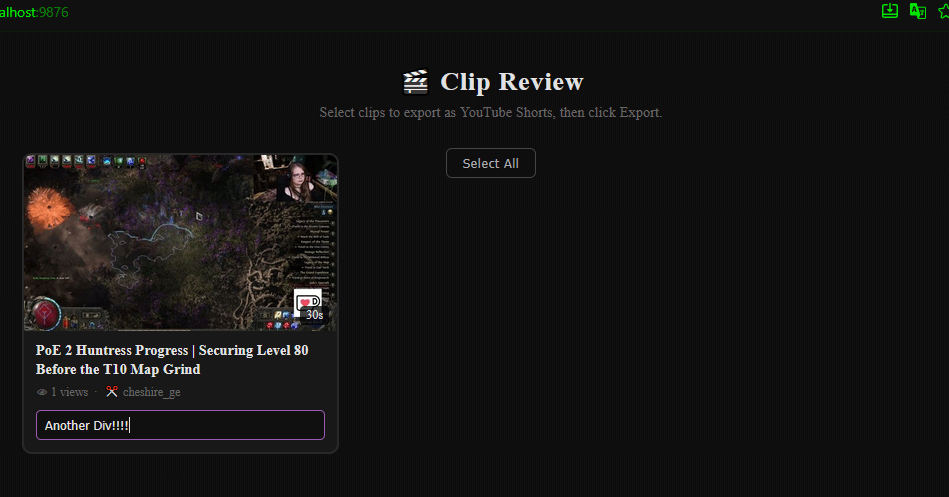
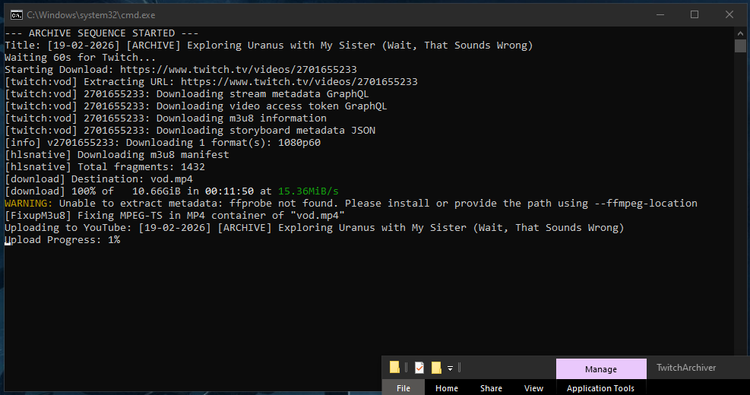
When my stream ends, I still get that command window to show up and give me the status of the whole VOD download, convert/fix, then upload progress. Now, alongside that, another command window shows up that fetches the clips. It opens an HTML window that shows me all of the clips for that stream session.
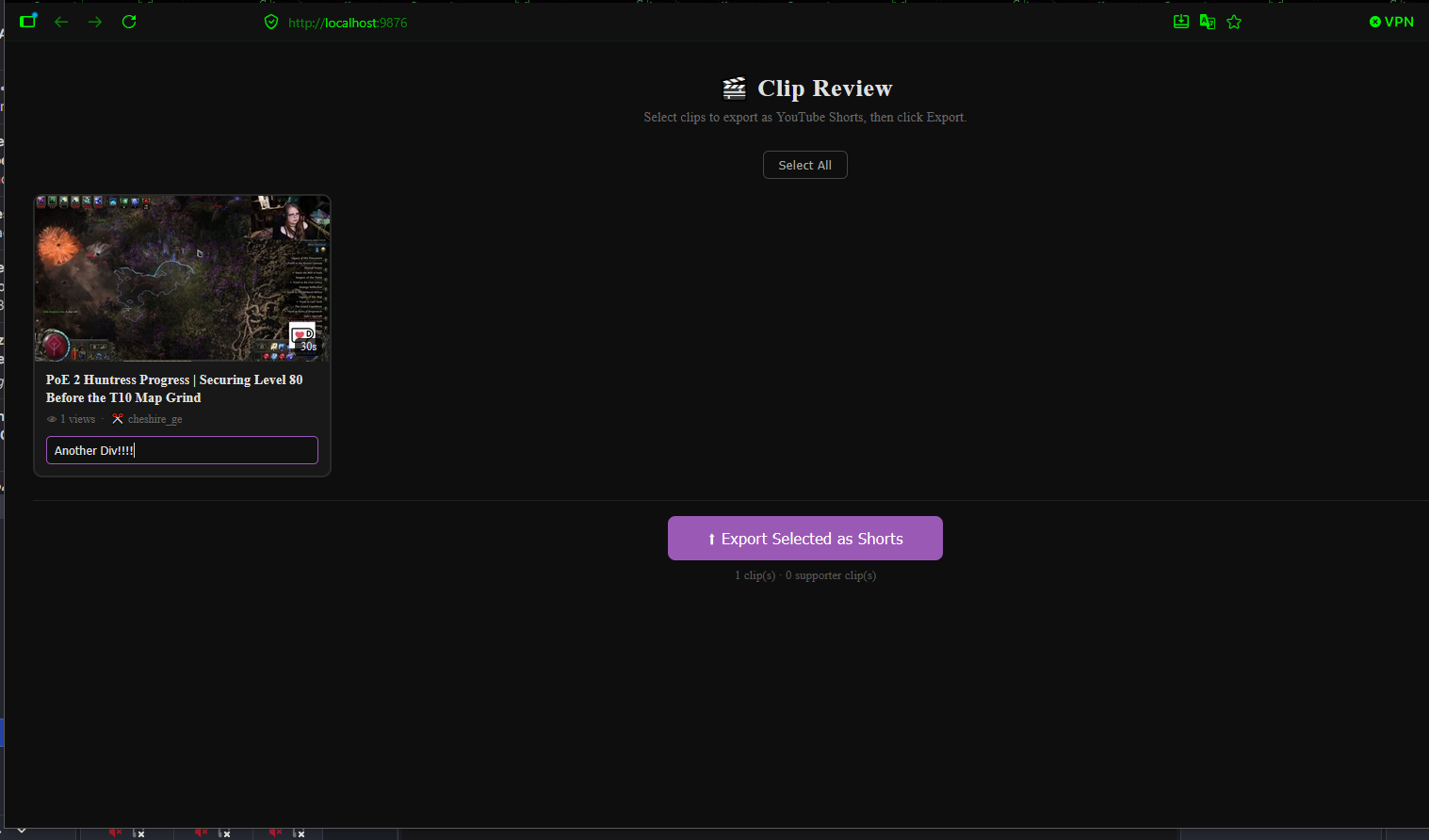
In order to have this work with Streamer.bot, you will need to add in a few things.
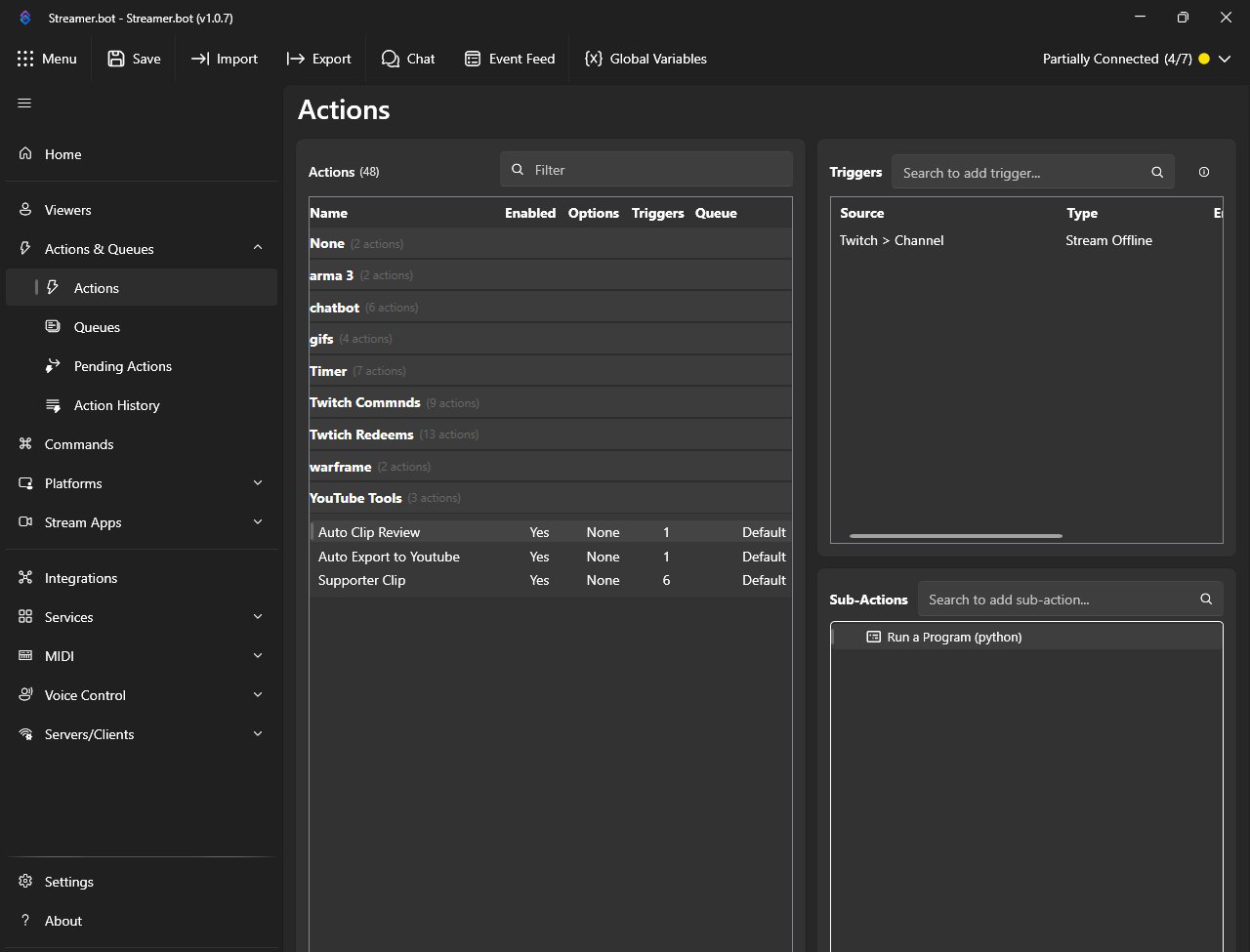
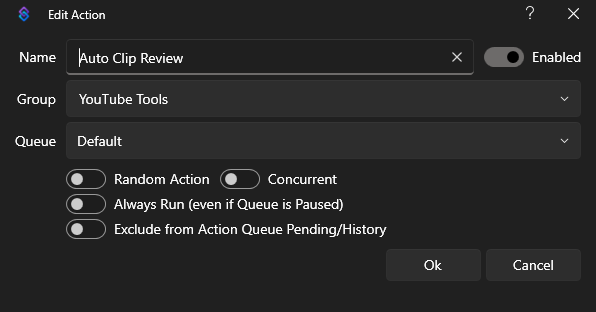
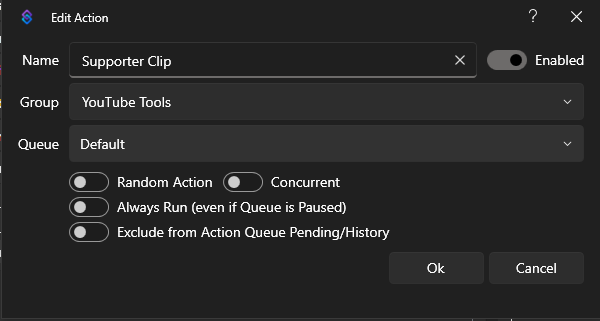
This is what I have set for my main Action. Nothing special here.
My Sub-Action in the lower right window:
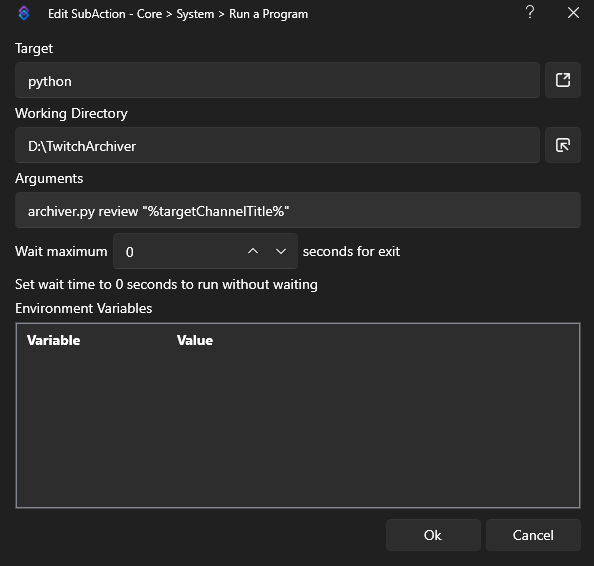
If you've renamed things or have it in another pathway, please rename accordingly.
"Special Clips" for Ko-fi and Patreon
I don't often get these kinds of interactions, so when I planned on getting something set up for these in particular, I had to make it a bit different. I looked into Streamer.bot's capabilities for capturing Ko-fi and Patreon donations and subscriptions, and the process looked easy enough.
I can't manually capture these specific clips. These are actually captured automatically, so the capture is my genuine reaction.
Quick note before you test any of this – and this applies to both the !clip action from earlier and the Supporter Clip action below: don't use Streamer.bot's built-in test button on your clip actions to check if they're working. It flags the request as test traffic, and Twitch's Clip API silently returns failure – no error, no red text, nothing in Action History. It'll just look broken even when it's set up correctly. Took me a while to figure that one out. Test with a real !clip in chat, or an actual Ko-fi/Patreon donation, and you'll actually see it work.
When my stream ends, these "special clips" are flagged with a 💜 in my review UI. This helps me differentiate which clips are the ones manually created and the ones that are triggered via Ko-fi and Patreon. In case I don't get a notification that a clip was caught for this, I can always default to the manual !clip method if I remember.
Here is a picture semi-helpful-walkthrough:
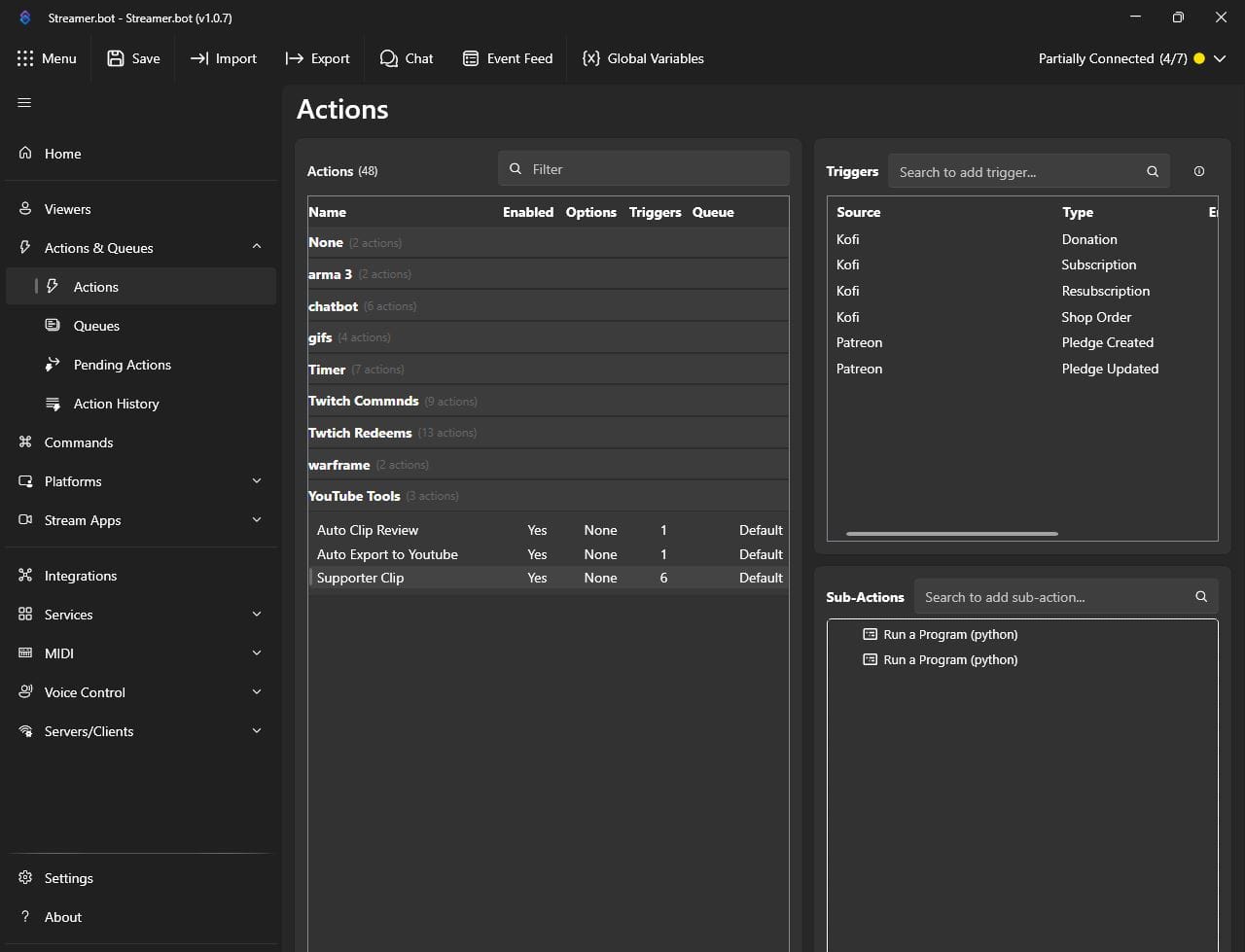
You will need to have a group in the Actions area that is easy to understand. I simply named mine YouTube Tools. Here, I have an action called "Supporter Clip".
Next up is creating 2 Sub-Actions, the small lower right window.
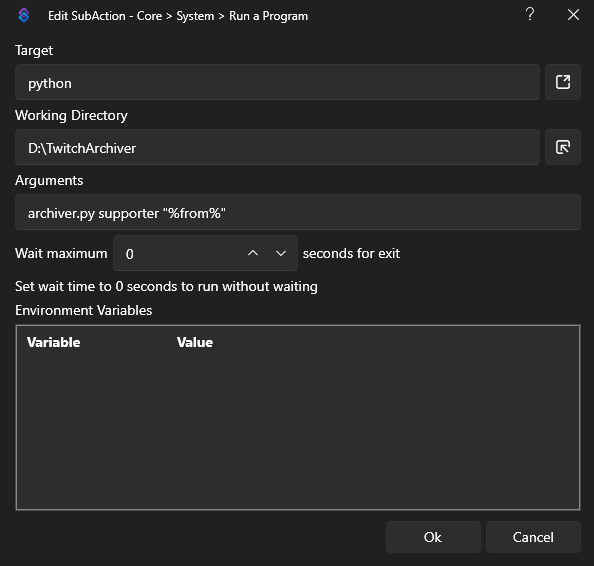
Please note that if you are renaming ANYTHING in this, reflect accordingly or else it won't work. For me, I have this is my D:\ drive, in a folder called TwitchArchiver. Obviously if you are hosting this somewhere else, just make sure the pathways match.
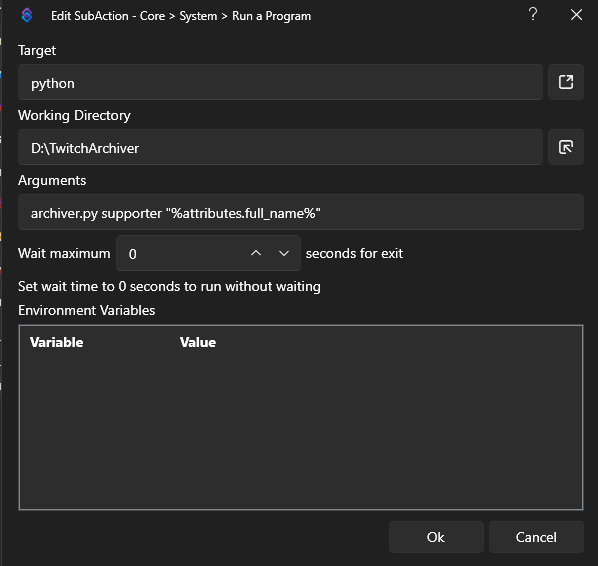
Same thing applies here: match pathways and names.
As for the Triggers window (top right), simply find the Kofi and Patreon options and add those in. There isn't any configuration for them. I picked all 4 Kofi options and both Patreon options, but if you want to have it slightly different, by all means go for it.
That's it for this round of updates. Up next on the list: a full StreamDeck Pi writeup, including a fun one where a single missing field in a WebSocket payload was silently dropping every command with zero errors. If you don't want to miss it, subscribe (for free!) and it'll land in your inbox the day it goes up.



Comments ()